Solution & Product

Meet Our Path — a calmer way to track symptoms.

Our Path helps patients capture how they feel between visits, translate those experiences into clear insights, and prepare for more meaningful conversations with their care team.

What Our Path Does

  1. 01

    Captures symptoms in real time, as they happen

  2. 02

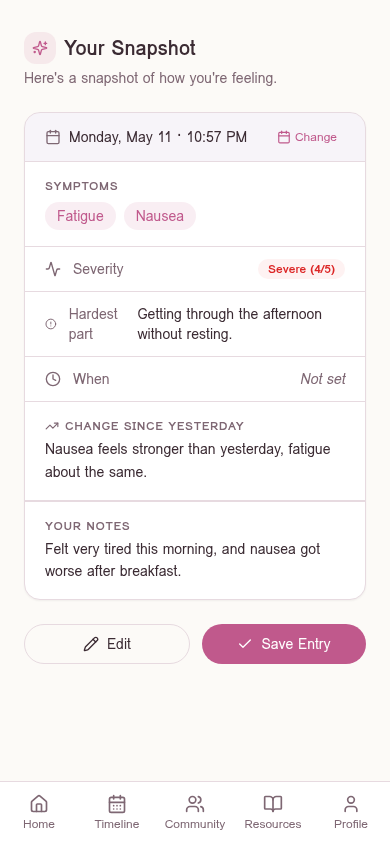
    Translates patient experiences into structured insights

  3. 03

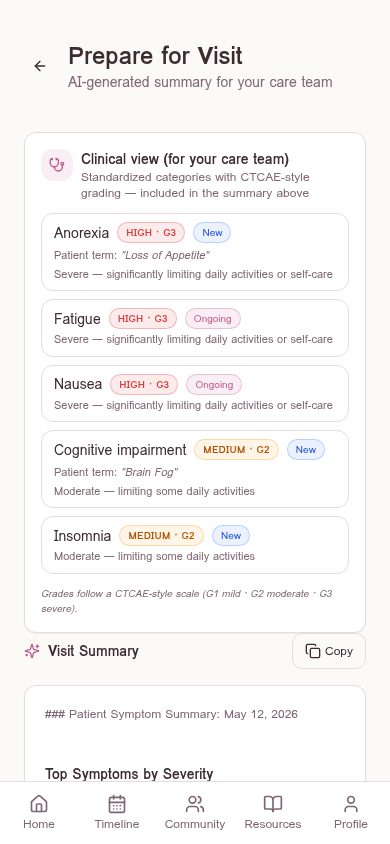
    Prepares patients and clinicians for more effective visits
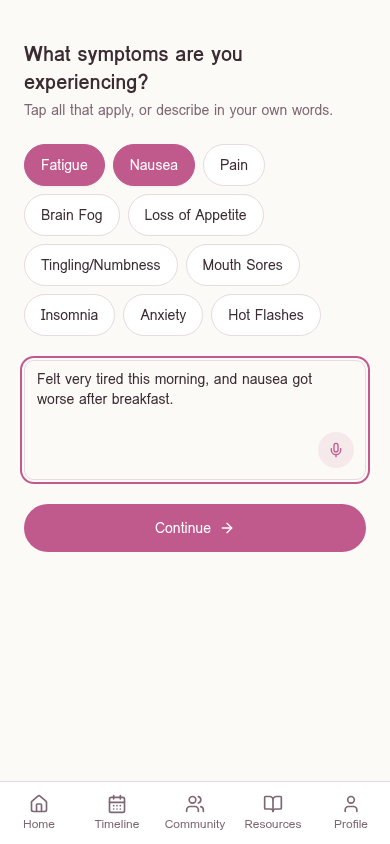
Our Path symptom logging screenOur Path entry snapshot with severity, timing, and notesOur Path AI-generated visit summary
Prototype showcase

Experience Our Path

Screen 1

Log Symptoms Easily

Capture how you feel in the moment using simple prompts, quick selections, or voice input.

Walkthrough

Explore the Full Experience

A closer look at the capabilities that support patients beyond the core flow.

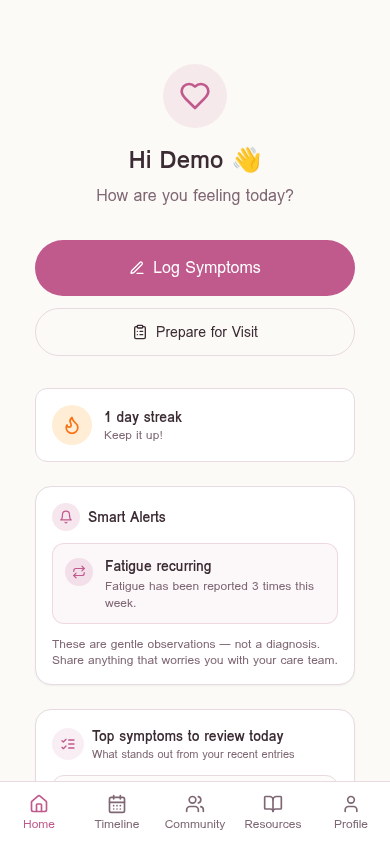
Our Path home with multiple entries and trend flags

01

See What Matters Over Time

Track patterns and recurring symptoms across days and treatment cycles, with trends highlighted automatically.
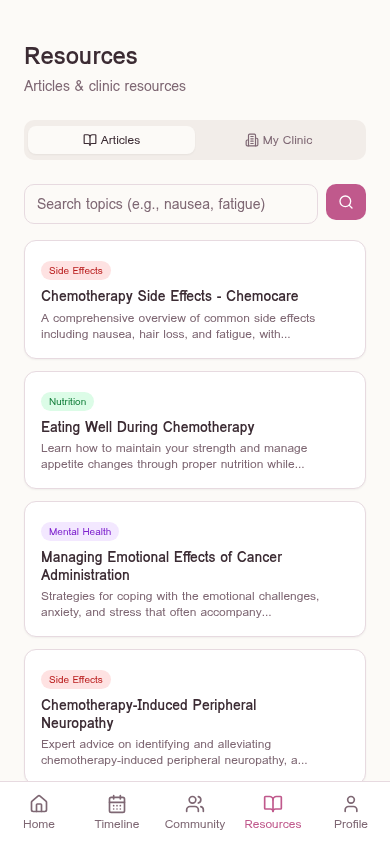
Our Path resources screen

02

Connect to Care and Support

Access relevant resources and guidance based on your symptoms and treatment journey.
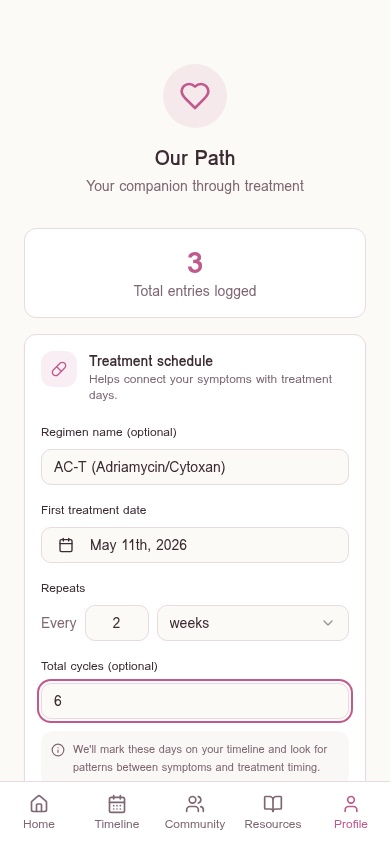
Our Path profile screen with treatment plan input

03

Personalized to Your Treatment

Input your treatment plan to provide context for symptom tracking and improve the accuracy of insights.

Built Around Your Experience

From daily check-ins to visit preparation, every feature is designed to fit naturally into a patient's routine.

Core Features

Six capabilities that make tracking feel effortless — and turn everyday moments into information care teams can use.

Real-Time Symptom Logging

Capture how you feel in the moment using prompts, quick selections, or voice input.

Structured Clinical Summaries

Translate patient experiences into clear summaries with severity, timing, and CTCAE-aligned grading to support clinical interpretation.

Smart Alerts

Identify worsening or recurring symptoms across entries and surface them clearly.

Symptom Prioritization

Highlight the most important symptoms to review before a visit.

Longitudinal Tracking

Track symptom progression and identify patterns over time.

Visit Preparation & Care Navigation

Generate visit-ready summaries and connect patients to relevant resources at their clinic, hospital, or nearby care network.

Under the hood

System Model

How the product turns everyday moments into insights ready for care.

Patient Input

Prompts, text, or voice

Processing

Severity and patterns

Structured Insights

Summaries and alerts

Prepared for Care

Visit-ready next steps

Each entry improves future insights
Research-backed

Designed from the Problem

Each feature responds to a specific gap in how symptoms are tracked today.

  • Symptoms occur between visitsContinuous, low-effort logging
  • Patients can't recall accuratelyCapture in real time
  • Language is inconsistentStructured summaries
  • Clinicians need actionable dataPrioritized, visit-ready insights
  • Trends drive outcomesVisualize progression over time
Case study

Prototype Development & Evidence

How we moved from research to a working product, and what we learned along the way.

01

What We Built

  • Functional prototype developed using Lovable
  • Workflow and interface designed in Figma
02

How It Was Developed

  • Features derived from clinical research and system analysis
  • Designed to address gaps in symptom timing, structure, and communication
  • Iterative process translating research insights into product features
03

Early Validation

  • Conducted interviews with 2 patient advocates and 1 clinician
  • Identified critical gaps in post-treatment symptom communication, including fatigue, recall challenges, and delays in reaching care teams
  • Confirmed that symptom tracking between visits, structured summaries, and severity ratings are highly valuable for both patients and clinicians
  • Validated the importance of simplicity, emphasizing low-effort interactions such as voice input and minimizing cognitive load
  • Highlighted the need for more contextualized symptom data, including trends over time and connections to treatment cycles
  • Reinforced the value of caregiver involvement and access to relevant resources
04

Next Steps

  • Introduce urgency detection and escalation signals to support faster clinical decision-making
  • Refine symptom capture to include more context (e.g., symptom type, timing, and treatment linkage)
  • Expand trend tracking across treatment cycles and integrate intervention and outcome tracking
  • Improve usability through simplified flows, clearer prompts, and onboarding support
  • Explore caregiver-facing features to support shared monitoring and communication
  • Conduct broader user testing with patients and clinicians to validate usability and workflow integration
Design rationale

Design Rationale

Our design decisions were guided by a simple goal: make symptom tracking feel natural for patients, while producing insights that are actually useful in care.

01

Reduce friction, not add burden

Instead of expecting patients to remember and report everything at once, we designed for small, low-effort interactions that fit naturally into daily life.

02

Structure without losing voice

Patients describe their experiences in their own words. Rather than forcing rigid forms, we capture that language and translate it into structured summaries in the background.

03

Surface signal, not noise

More data isn't always better. We focused on highlighting the most important changes and patterns, so patients and clinicians can quickly understand what needs attention.

04

Design for real-world variability

Patients vary in energy, attention, and comfort with technology. The system supports multiple input methods, including guided prompts and optional voice input, to meet users where they are.